The complete guide
How to Choose a Coding Robot Mouse Set (And Get the Most From It)
The problem with teaching kids to code on a screen
Most first coding apps go something like this. A child drags a few blocks together, taps run, something happens on the screen, and the instructions scroll away. If it works, great. If it does not, the child often has no idea which bit was wrong, so they start randomly rearranging blocks until something sticks. That is not problem solving. That is guessing with better graphics.
There is also the plain fact that a lot of parents and teachers are trying to reduce screen time, not add to it. Being told that the best way to prepare a six year old for the future is another hour on a tablet does not sit well with everyone.
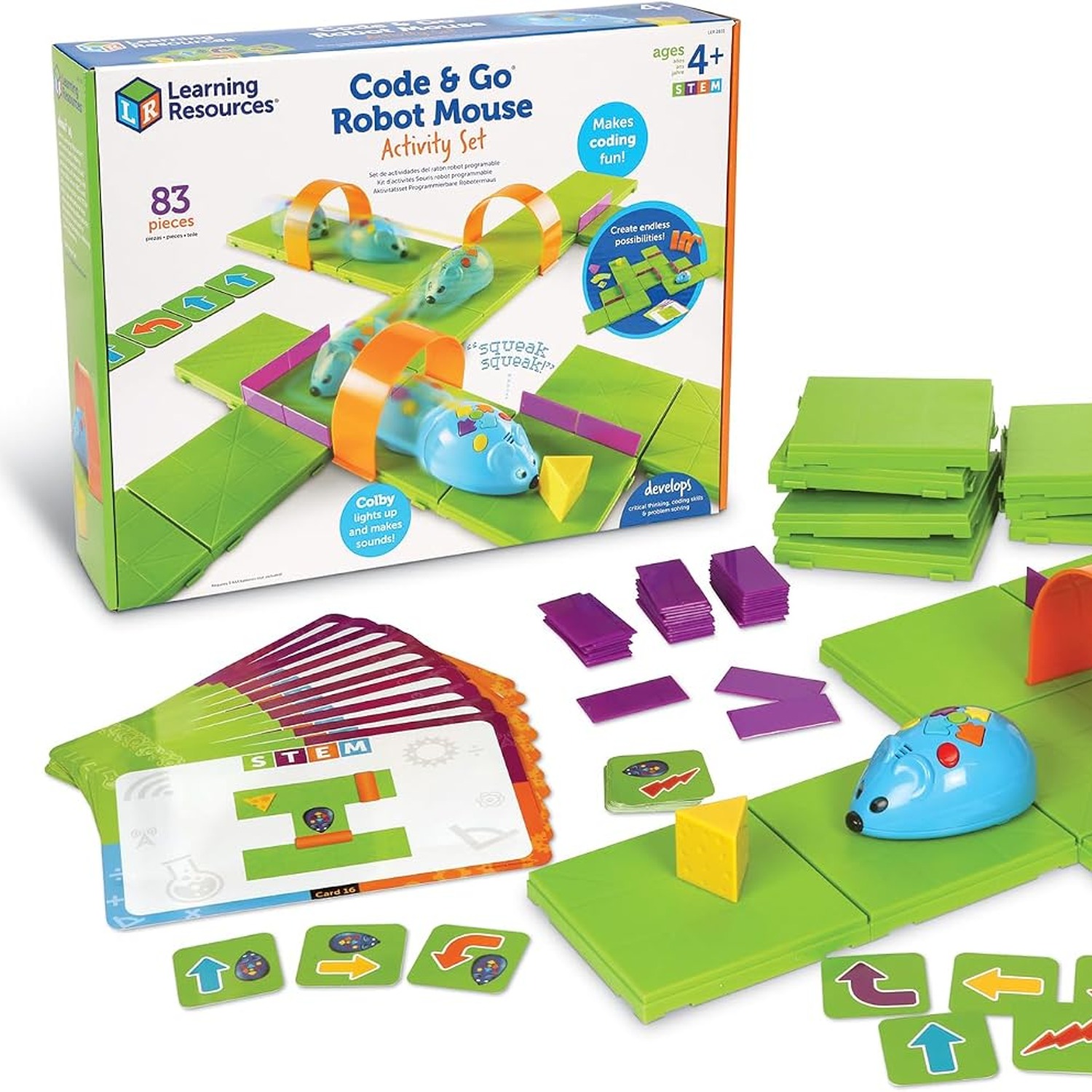
A coding robot mouse set takes the same ideas and makes them physical. The program is a row of cards on the table. The output is a small plastic mouse trundling across a maze the child built with their own hands. When it goes wrong, the mistake is sitting there in front of them, in order, waiting to be found.
How the Coding Robot Mouse Activity Set works
The set has three parts that work together.
First, the maze. Sixteen grid tiles click into a board measuring 20 inches by 20 inches. Twenty-two walls slot in to block routes, and three tunnels let the mouse disappear and pop out somewhere else. The cheese wedge marks the goal. Building the maze is half the fun, and it is also the first bit of planning, because a child who builds a route has to think about where it starts and ends.
Second, the mouse. Colby is four inches long, lights up, makes sounds and has two speeds. On its back are coloured directional buttons. You press them one at a time to build a sequence, then hit go and the mouse runs the whole thing from start to finish. It does not stop halfway to ask if you meant it.
Third, the cards. Thirty double-sided coding cards use the same colours as the buttons. Before touching the mouse, the child lays the cards out in a row: forward, forward, turn, forward. That row is the program. Then they copy it into the mouse. It sounds like an extra step, and it is, but it is the step that makes everything else click. The plan exists outside the child's head where it can be checked.
Why the card step matters more than it looks
Here is what usually happens the first time. A child builds a maze, presses six or seven buttons from memory, and the mouse ends up facing a wall. They shrug and press buttons again. Still wrong. Frustration follows.
Now the same child with the cards. The program is on the table. You can point at card three and say, "What did the mouse do on this one?" They walk along the maze with a finger, find the turn that should have been the other way, swap one card and run it again. It works. That feeling, the one where a small deliberate fix produces the right result, is what keeps kids coming back.
That is debugging, and it is honestly the most valuable thing in the box. Professional programmers spend far more time finding mistakes than writing new instructions. Starting that habit at five, with plastic cards instead of error messages, is a decent head start.
Who it suits
The recommended age is 5 to 15 years, which is a wide range, and in practice different ages use it differently.
Five and six year olds get the core idea with an adult beside them for the first couple of goes. Keep the mazes short. Four or five steps is plenty. The win here is sequencing: understanding that order matters and that the mouse will do exactly what you told it, not what you meant.
Seven to nine is probably the sweet spot. Children at this age will build their own mazes, plan longer routes, and start predicting what will happen before pressing go. They also start enjoying the tunnels, which break the straight-line thinking.
Ten and up tend to flip the activity around. Instead of solving mazes they design them, usually with the goal of making the route as awkward as possible for a sibling or classmate. That is still coding thinking, just from the other side.
For classrooms and homeschool groups, it works as a station. Set a challenge, let a pair work it, reset and swap. The pieces are plastic and wipe clean, which matters when the same set gets handled by thirty children a week.
Choosing between coding toys
If you are comparing options, a few questions sort most of it out.
Does it need a screen, an app or an account? This one does not. It runs on 3 AAA batteries (not included) and nothing else. That is a real advantage if you want something usable in a car, at a grandparent's house or in a classroom with patchy wifi.
Is there a physical record of the program? Many robot toys let you press buttons but give you nothing to look back at. The 30 coding cards here are the difference between learning and guessing.
Can it grow with the child? An 83-piece set with 22 walls and 3 tunnels has far more possible layouts than a child will exhaust. The difficulty comes from the maze, not the robot, so it scales naturally.
Can one child use it alone? Some of the best hands-on learning toys collapse without a second player. This one works solo thanks to the activity cards, and gets better with two.
How much setup is involved? There is no assembly. Clicking the grids together takes a minute or two and children usually want to do it themselves.
Getting the most out of it in the first week
Start smaller than you think. A three-step route to the cheese feels almost too easy to an adult, and is about right for a first try with a five year old. Success first, difficulty later.
Use the activity guide rather than freestyling at the start. It introduces concepts in order, which saves you inventing a curriculum on a Tuesday evening. The 10 double-sided activity cards give you ready-made challenges when you run out of ideas.
Run the mouse on the slower speed early on. It gives children time to watch each movement and connect it back to the card they laid down.
Let them build the maze. It is tempting to set it up yourself for speed, but the building is where spatial thinking happens, and children defend a maze they designed far more enthusiastically than one handed to them.
Resist fixing it for them. When the mouse goes wrong, ask which card was the problem instead of pointing at it. The pause is uncomfortable for about ten seconds and then they find it.
Care and storage
Wipe the mouse, grids, walls and tunnels with a damp cloth when they get grubby, and dry them before putting them away. Nothing goes in water or a dishwasher, particularly the mouse with its battery compartment. Keep the coding cards flat so they do not curl at the corners.
Store the whole thing in a lidded box. The walls and the cheese wedge are the pieces most likely to wander off under a sofa, and a set missing walls is noticeably less fun. If the set is going away for a season, pull the AAA batteries out so a leak cannot damage the contacts.
The short version
This is a coding toy that behaves like a board game. A child builds a maze, writes a program with coloured cards, loads it into a small robot mouse and watches it run. When it fails, the mistake is visible and fixable, which is exactly the lesson worth teaching.
The set has 83 pieces, suits ages 5 to 15, needs no assembly and runs on 3 AAA batteries you supply yourself. It works for one child, works better for two, and holds up to classroom use. If you want to introduce programming without handing over another screen, this is a sensible place to start.